
Add Task/Sub-action Preview While Selecting Dependencies
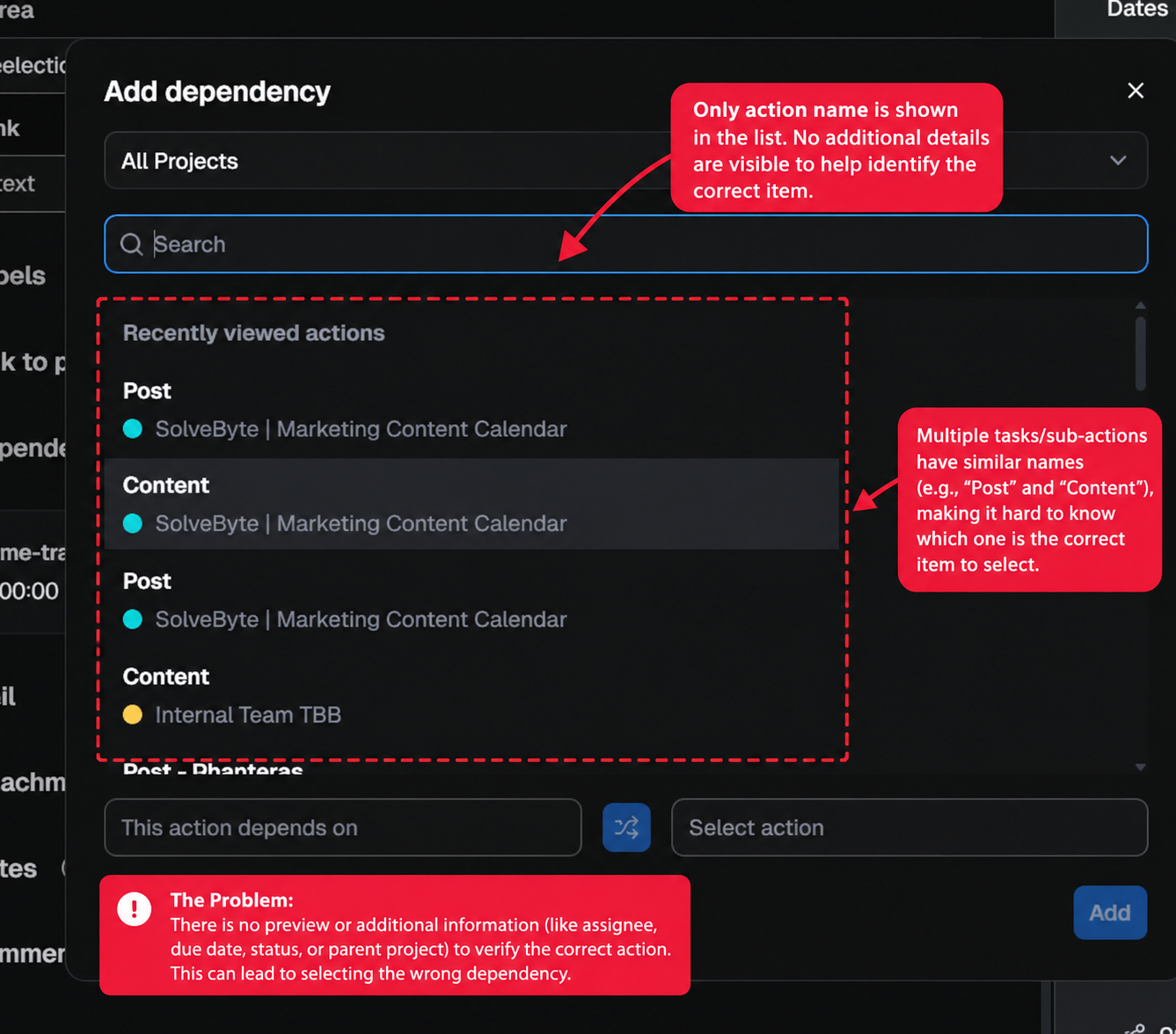
Currently, when adding a dependency to an action or sub-action in Hive, the selection window displays a list of actions with limited identifying information. When multiple tasks or sub-actions have similar or identical names, it becomes difficult to identify the correct item.
Proposed Improvement:
Introduce a small preview panel, tooltip, or expandable information card when hovering over or selecting an action/sub-action in the dependency selection window.
The preview could display useful identifying details such as:
- Full task or sub-action title
- Parent action or project name
- Assignee
- Current status
- Due date
- Simple ID or Ticket ID (if available)
This would allow users to verify that they are selecting the correct action before adding the dependency.
Expected Behaviour:
Ideally, users should be able to hover over an item or click a small preview icon to see its details without leaving the dependency selection window.
This would be particularly useful for teams managing multiple projects with similar task names, nested sub-actions, or large numbers of tickets.
The goal is to make dependency management more intuitive, reduce accidental dependency assignments, and save time spent identifying the correct actions.
A small contextual preview could make a significant difference to the overall user experience.
1 comment
Read the full discussion in Hive Network
Start a free trial to read every request and its replies in Hive Network. Teams on a paid plan also vote and post.
Start free trial Already use Hive? Sign inMore everything else requests
- 372votes
Timeline
Shipped Provide functionality to generate an independent timeline (e.g., high level perspective) of project activities and milestones, like in MS Project. Should be able to build independent from Gantt chart. Gantt chart needs to let users configure the time scale, because current implem
- 344votes
UNDO BUTTON
Shipped I have no idea how this is not a feature. Control Z only works of you are still in the cell. Generally, you don't even know you have made a mistake until you leave the cell. The amount of time I have wasted recreating cells
- 302votes
Dark Mode
Shipped The screen is bright and having to look at it all day hurts my eyes. A dark mode would be nice to give my sight a break from staring at screens all day.
- 235votes
Customize notifications per project
Shipped As a manager, I'm on over 50 projects and am receiving many desktop notifications. Ideally I’d love to set notifications to be customized on the project level if not just the individual actions assigned to myself. It would be nice to toggle which projects you get notifications fo
- 234votes
Bulk editing
Shipped I wish there was a way to bulk edit actions or projects. For example in Table view I might see dozens of actions that all need to have their labels updated or their due dates updated. Currently i have to open every one individually which takes forever and stunts my productivity.
Yes i faced this issue too