

" transform="translate(6.667 25)" width="26.666666666666668px"/><path d="M 6.667 13.333 C 10.349 13.333 13.333 10.349 13.333 6.667 C 13.333 2.985 10.349 0 6.667 0 C 2.985 0 0 2.985 0 6.667 C 0 10.349 2.985 13.333 6.667 13.333 Z" fill="transparent" height="13.333333333333336px" id="m1fSvCRzI" stroke-dasharray="" stroke-linecap="round" stroke-linejoin="round" stroke-width="3.33" stroke="rgb(13, 27, 62)" transform="translate(13.333 5)" width="13.333333333333334px"/></svg>)
" transform="translate(5 6.667)" width="30px"/><path d="M 0 0 L 0 6.667" fill="transparent" height="6.666666666666666px" id="CaiNLpJCJ" stroke-dasharray="" stroke-linecap="round" stroke-linejoin="round" stroke-width="3.33" stroke="rgb(13, 27, 62)" transform="translate(26.667 3.333)" width="1px"/><path d="M 0 0 L 0 6.667" fill="transparent" height="6.666666666666666px" id="xGLT9Vw9m" stroke-dasharray="" stroke-linecap="round" stroke-linejoin="round" stroke-width="3.33" stroke="rgb(13, 27, 62)" transform="translate(13.333 3.333)" width="1px"/><path d="M 0 0 L 30 0" fill="transparent" height="1px" id="uv_5VZMDi" stroke-dasharray="" stroke-linecap="round" stroke-linejoin="round" stroke-width="3.33" stroke="rgb(13, 27, 62)" transform="translate(5 16.667)" width="30px"/></svg>)
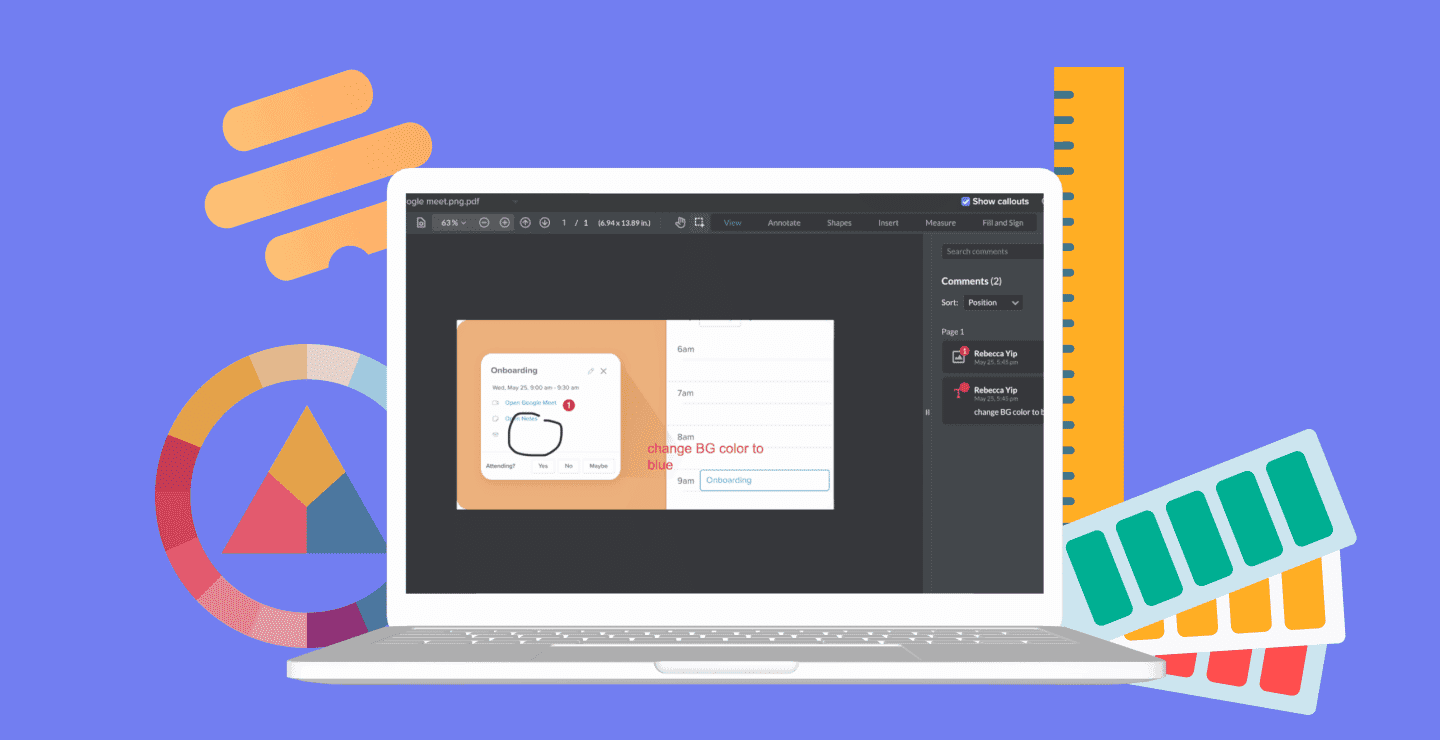
Project management software for creative teams connects briefs, timelines, files, feedback, approvals, and workloads in one place. The best tools reduce administrative work while giving designers, writers, marketers, and clients a clear path from request to final asset.
Prioritize the handoffs that most often delay delivery: intake, version control, proofing and approvals, client access, or resource planning. A strong platform should preserve creative flexibility while making ownership, status, and the latest approved file unmistakable.
Vendor pricing changes frequently. Hive pricing below was checked July 27, 2026; confirm current packaging with every provider before buying.
Ways Creative Teams Use Project Management Tools
Creative teams use project management software to standardize six recurring parts of delivery:
Document tracking: Keep briefs, designs, copy, and final assets connected throughout the review lifecycle.
Proofing and approvals: Collect contextual feedback and final decisions in one system instead of splitting them across chat and email.
Centralized communication: Keep task conversations beside the work so teams can understand decisions without reconstructing a message thread.
External collaboration: Give clients and partners appropriate visibility into progress and approvals. Hundreds of agencies use Hive to coordinate this work.
Time and resource management: Compare planned capacity with actual effort, especially when work is billed by client or project.
Creative-tool integrations: Connect the project hub with design, automation, and production tools used by marketing agencies and photo editing studios.
Top Project Management Tools For Creative Teams
With this insight in mind, we're bringing you some of the best project management tools with the features and functionalities that can help any creative team work faster and maximize productivity. So read on to discover our picks for the best project management tools for creative teams.
1. Hive
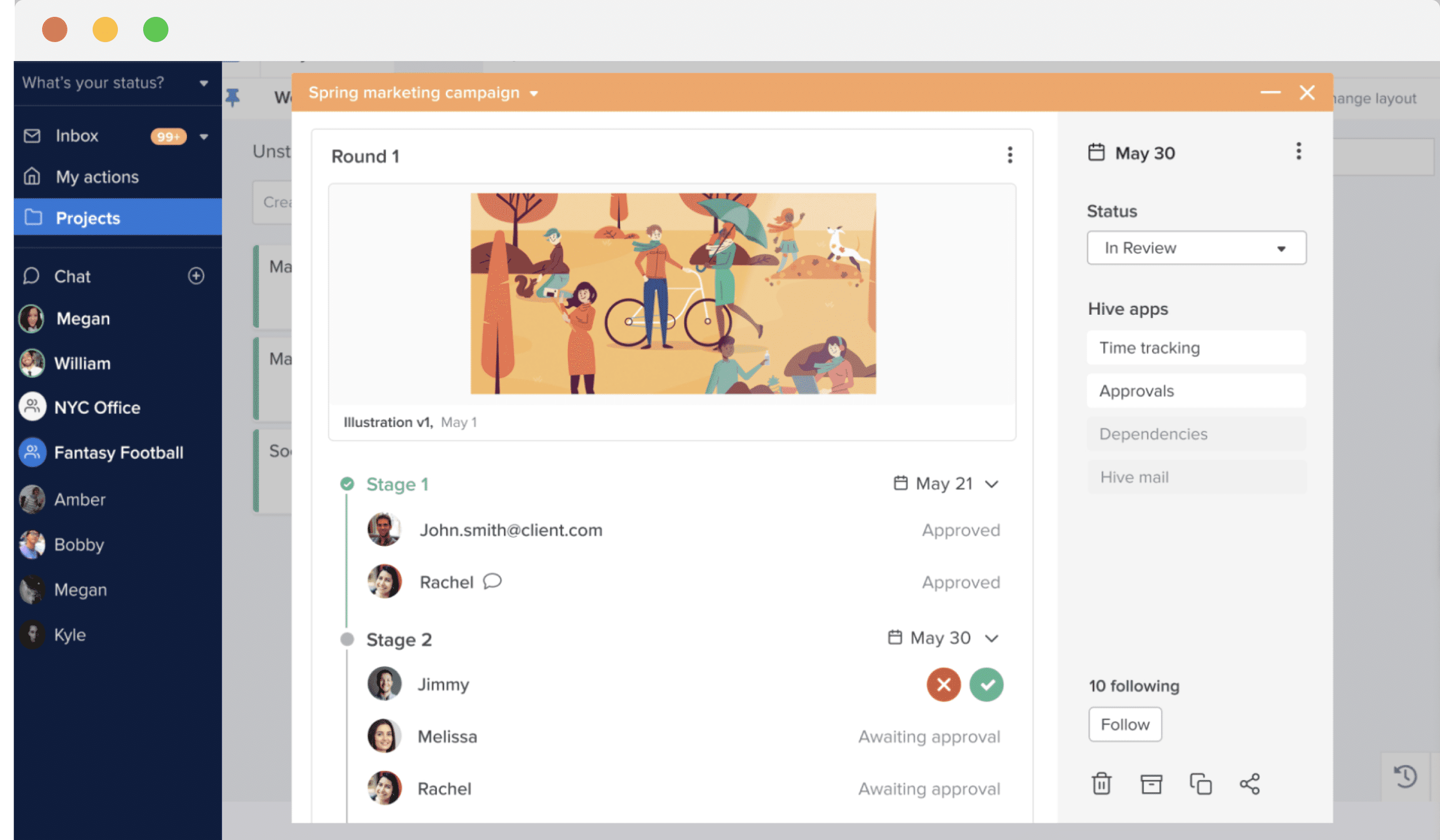
Hive combines project planning with optional proofing and approval capabilities for creative teams. Teams can review documents and videos, manage multi-round approvals, assign owners and due dates, attach files, and keep discussion on the relevant Action card. External users can be given controlled access for client collaboration, while flexible project views let each team organize the same work as a Gantt chart, Kanban board, calendar, table, or portfolio.
Other features that make Hive a great choice for creative teams:
Flexible project views including Gantt, Kanban, Portfolio and Calendar view
Real-time analytics to power team performance
Resourcing and time tracking for teams
Forms and templates to create repeatable team-wide processes
Integrations with 1000+ tools like Zoom, Adobe Photoshop and Dropbox
Access to the Hive community for practical resources, peer advice, and product education.
Try Hive free for 14 days, with no credit card required. Hive Free supports up to 10 workspace members. Starter costs $5 per user per month, while Teams costs $12 per user per month before optional add-ons. Creative teams can add capabilities such as proofing and approvals, external users, resourcing, and advanced dashboards as needed.
2. Asana
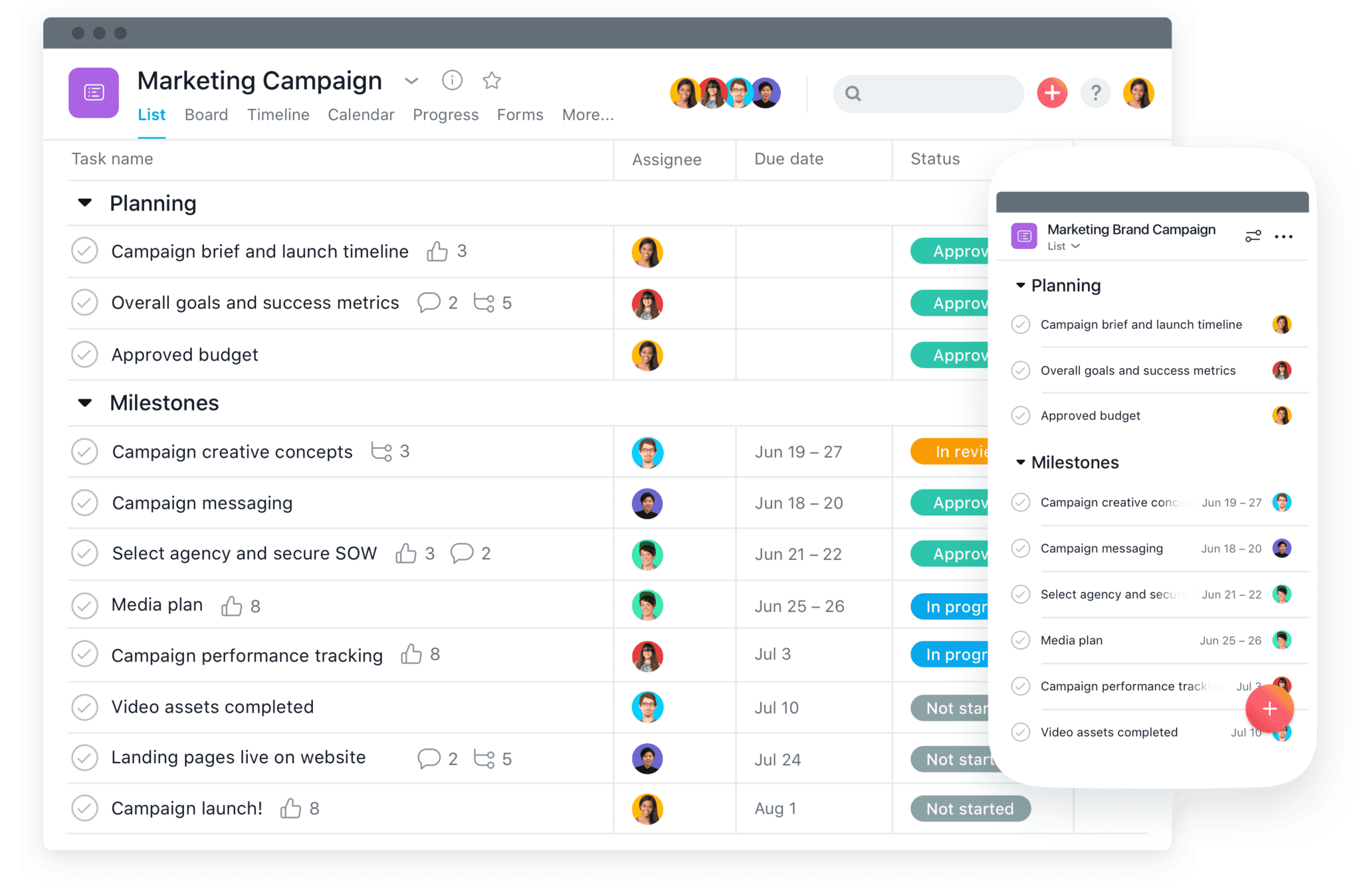
Asana’s visually appealing interface is a favorite of designers and creatives around the world. With Asana, creatives can easily find and share files, track and manage work across multiple projects, or use a Kanban board to map out a creative project launch. In terms of project management tools for creative teams, Asana takes the cake for one of the most aesthetically pleasing, which is why it's one of our best project management tools for creative teams.
Features of Asana:
Leverage flexible project views including boards, calendar, and timeline
Automate tasks with a few clicks to streamline your team's work
Utilize forms to streamline all work relates requests
Portfolio view that lets you manage milestones across key stakeholders
Check out our comprehensive list of Asana alternatives to learn about other similar tools on the market.
3. ProofHub
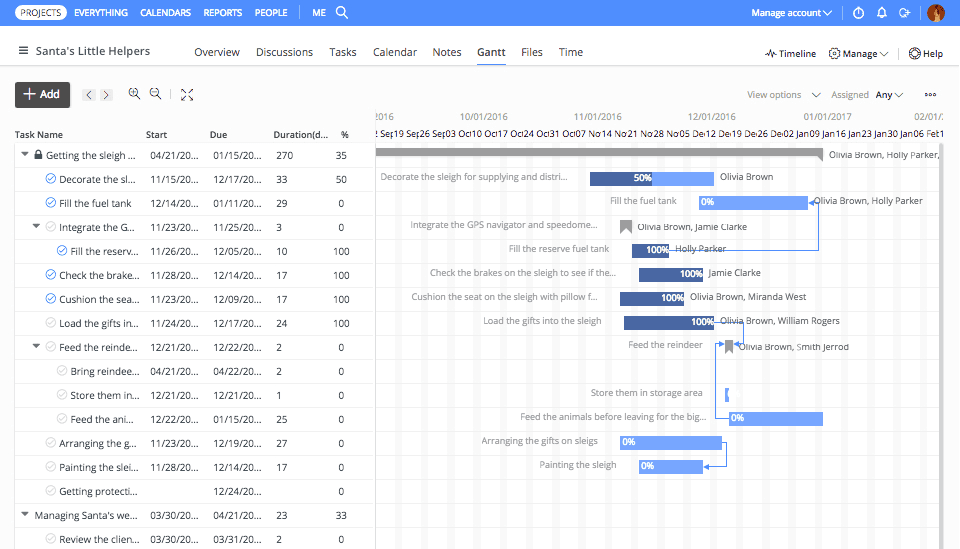
ProofHub is an award-winning project management software that fosters real-time collaboration in creative teams. The easy-to-use proofing tool works like a breeze to simplify and speed up the creative feedback and review process.
With ProofHub creative teams can easily plan their tasks, collaborate with each other, and keep their work organized, which makes this software the perfect option for them -- that's why it's one of our best project management tools for creative teams.
Features of ProofHub
Visualize the tasks using Custom workflows and kanban boards and stay on top of everything
Multiple views (Timeline, Board, Calendar, Table and List) for an added flexibility in the way creative teams work
A dedicated space to carry out real-time discussions and brainstorming
File sharing and online proofing to foster real-time collaboration
4. Flow
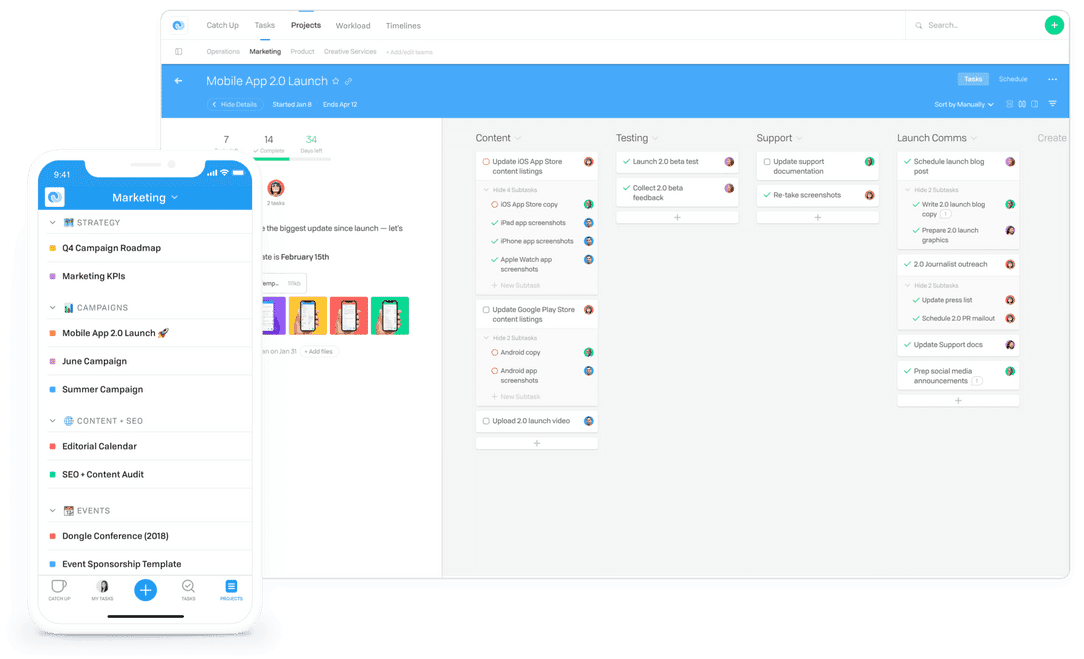
A lesser known project management tool, Flow is one of the top project management tools for creative teams because you can communicate seamlessly, assess project scope and progress from a birds-eye view, and organize team bandwidth via resourcing. With Flow, you can also attach files from Figma and other Figma alternatives like InVision directly to tasks and projects. In terms of project management tools for creative teams, Flow has some killer features that you should consider looking into.
Features of Flow:
Several different project views including list, Kanban, and calendar view
Ability to create visually appealing project timelines to provide at-a-glance status updates
Dashboards that let you see each project belonging to a team
Project scheduling functionality
Real-time notifications on all tasks and projects
5. Paymo
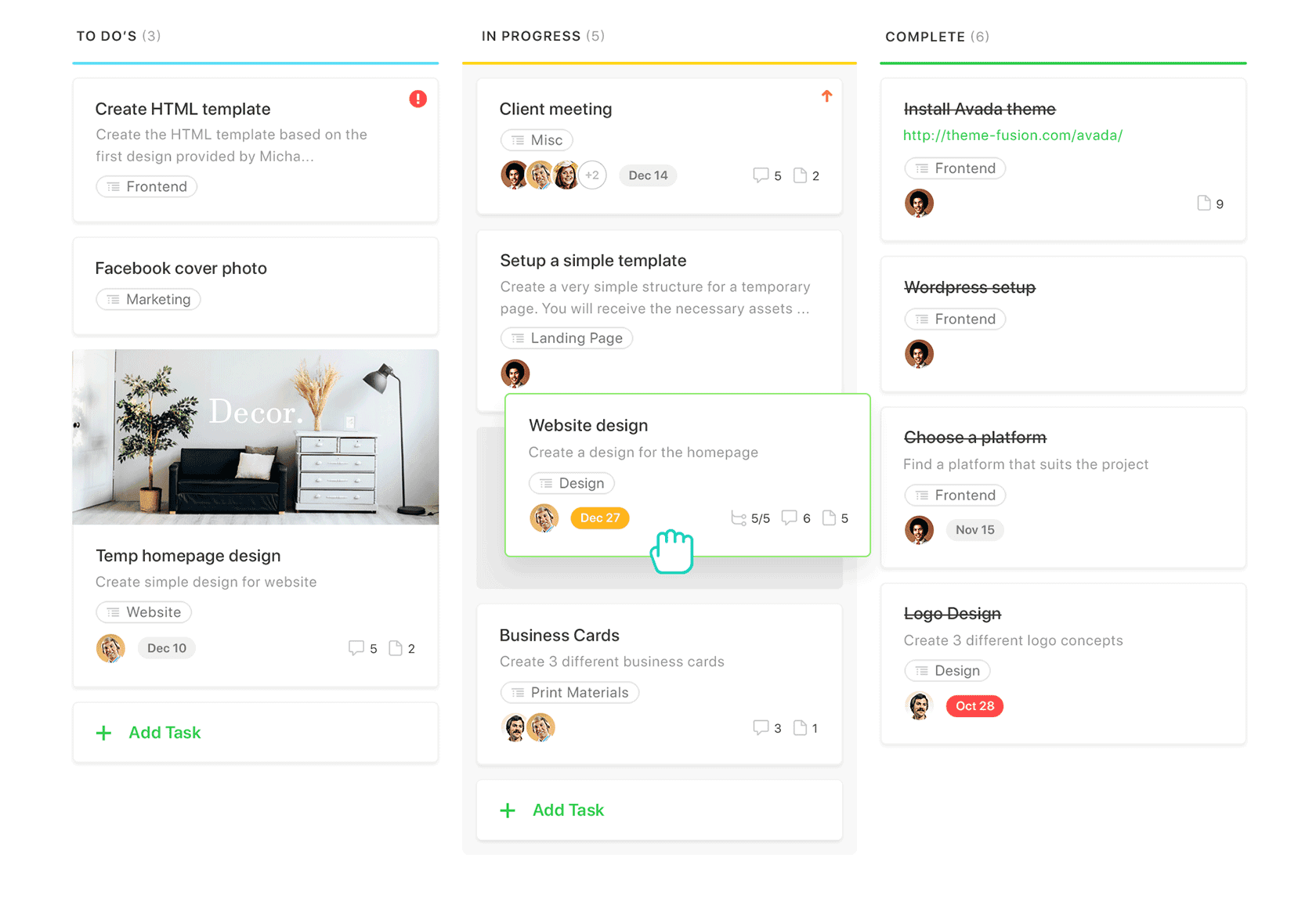
Paymo is especially useful as a project management tool for creative teams because it helps them understand project overviews, track time easily, and collaborate in their discussion module. This is another one of the top project management tools for creative teams. Overall, the features of Paymo make it ideal for project based work, and the discussion module helps keep all project intricacies in one place, which is great for creative teams as they pass work off to different individuals on the team.
Features of Paymo
Plan and schedule tasks with Gantt charts and Portfolio Gantt, which helps you see the big picture
Comprehensive task management including dependencies, multi-user assigning, and task templates
Milestones that help you set up alerts for major events
A central Team Tasks dashboard that shows all projects grouped by task priority/due date/project
Resource management tools for tracking bandwidth and allocation
6. Smartsheet
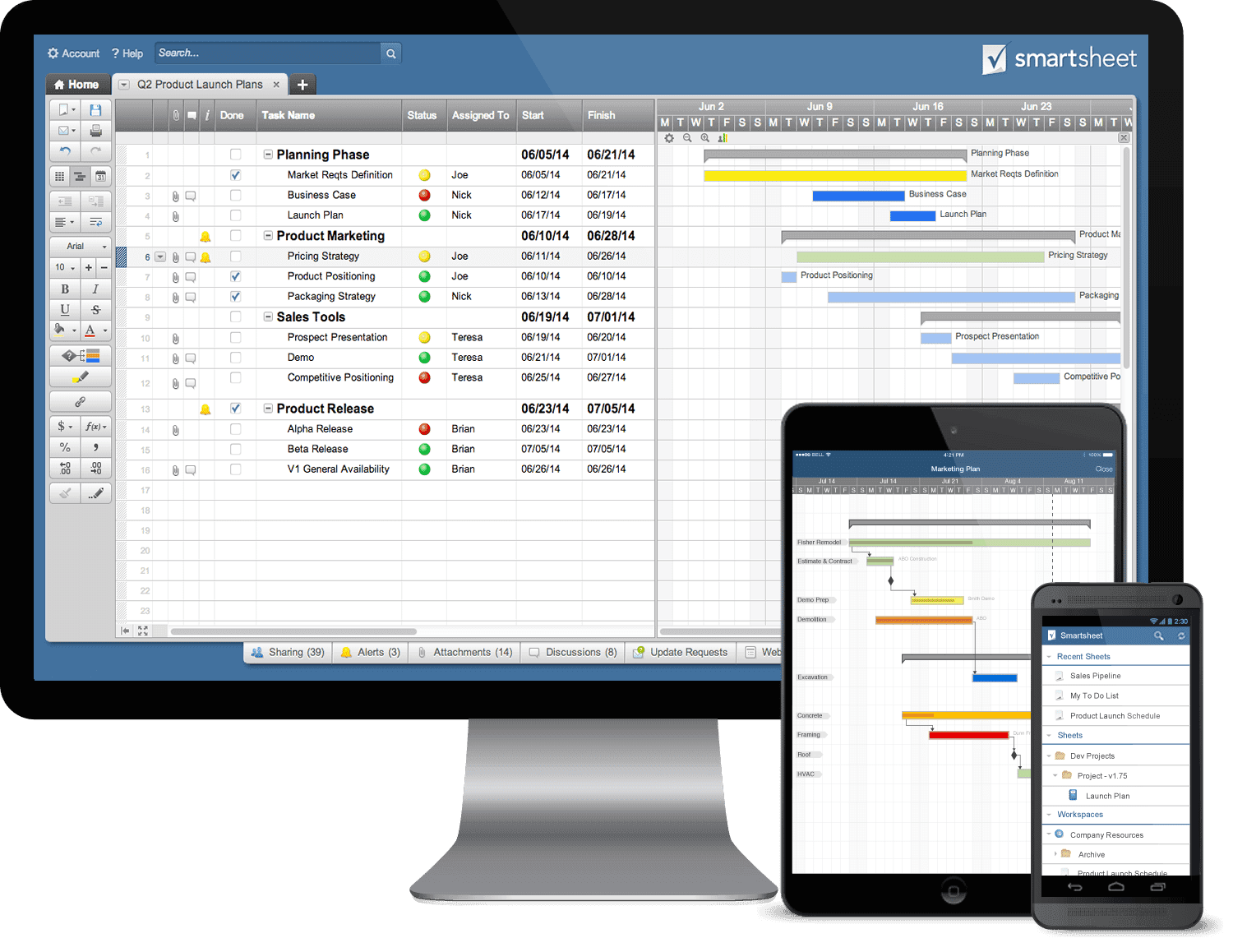
Smartsheet is one of the top project management tools for creative teams because it is straight forward. Smartsheet is based on a table view, which looks similar to an Excel spreadsheet. This tool is cloud-based, and also allows users to switch between a few other data visualization views.
Features of Smartsheet:
Grid, Gantt and chart view for easily digestible content
Ability to consolidate key information into reports
Dashboards to display key information, charge and images
Pre-built templates that make it easy to plug in new information
Continue your research with this guide to the top Smartsheet alternatives on the market.
7. Robohead
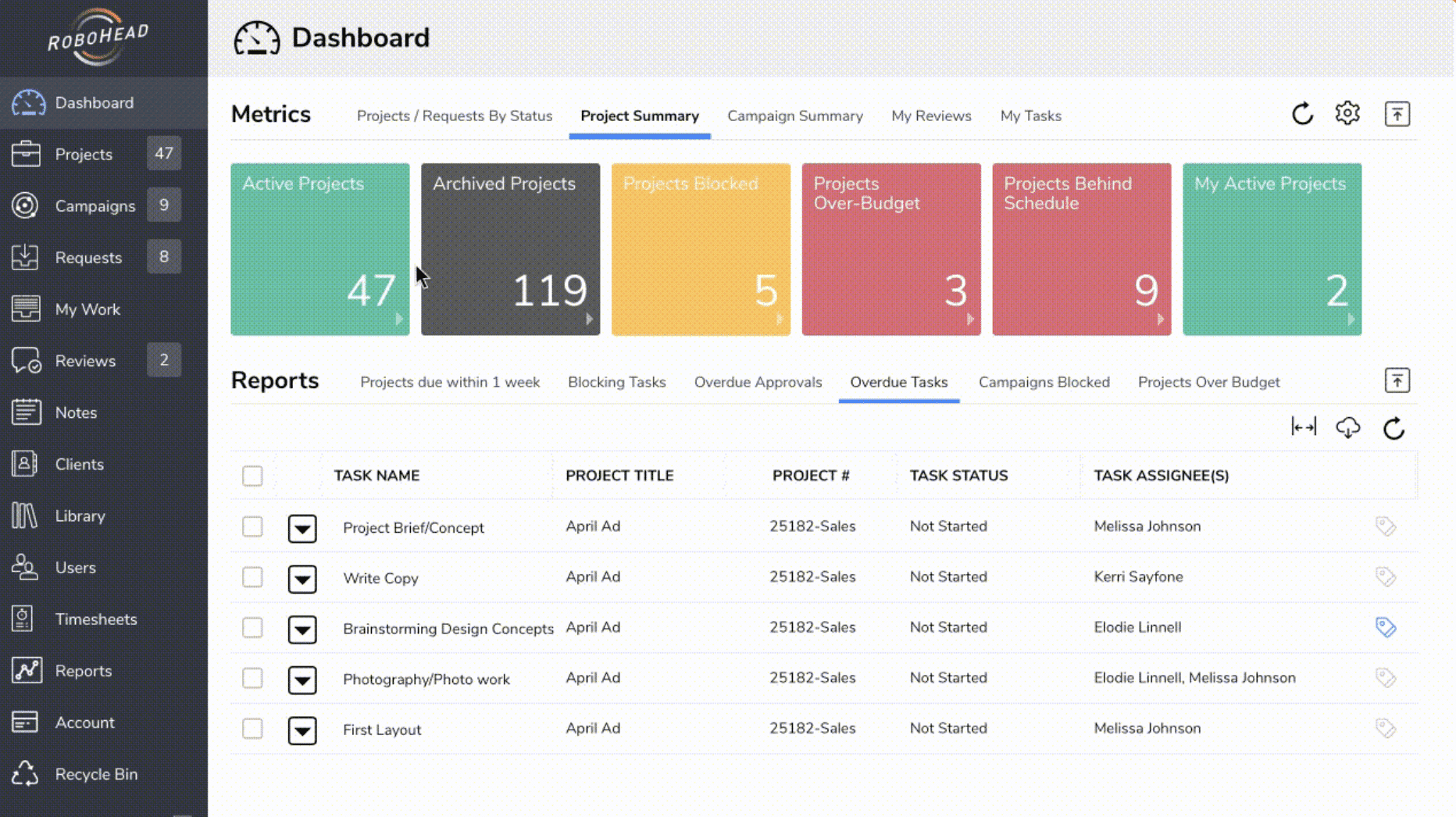
Robohead is a project management software built for creative teams and agencies. This tool allows you to manage creative projects from inception to completion with a variety of features including request forms, conditional logic, approvals, templates, flexible projects views, and more.
Features of Robohead:
Flexible project views including calendar, Gantt and Kanban
Personal "To Do" lists for each user to help sort ongoing and upcoming tasks
Timetracking for agencies billing hourly
Notetaking tool inside Robohead for team meetings
8. nTask
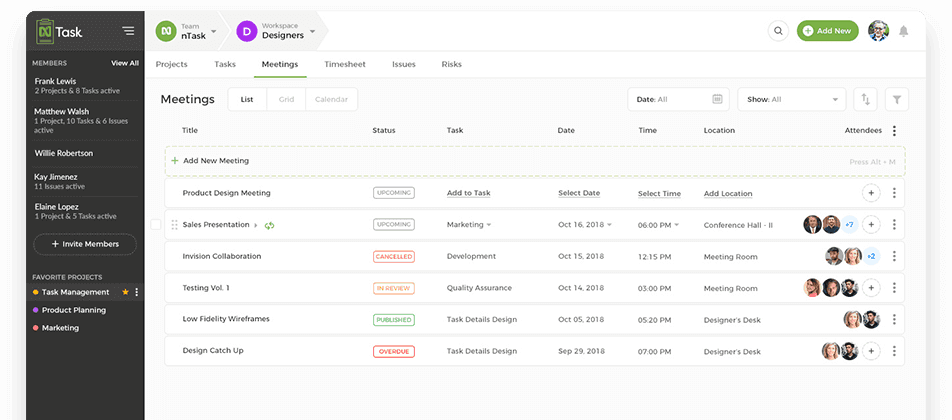
nTask is a free project management tool ideal for creative teams, as it allows seamless collaboration between groups that need to assign tasks, track time, and create projects together. With nTask, you can easily schedule, create, and assign tasks to creative team members from anywhere in the world.
Features of nTask:
Task prioritization
To-do lists with dependency tracking
Ability to attach files
Collaborate in real-time with colleagues through comments
9. Notion
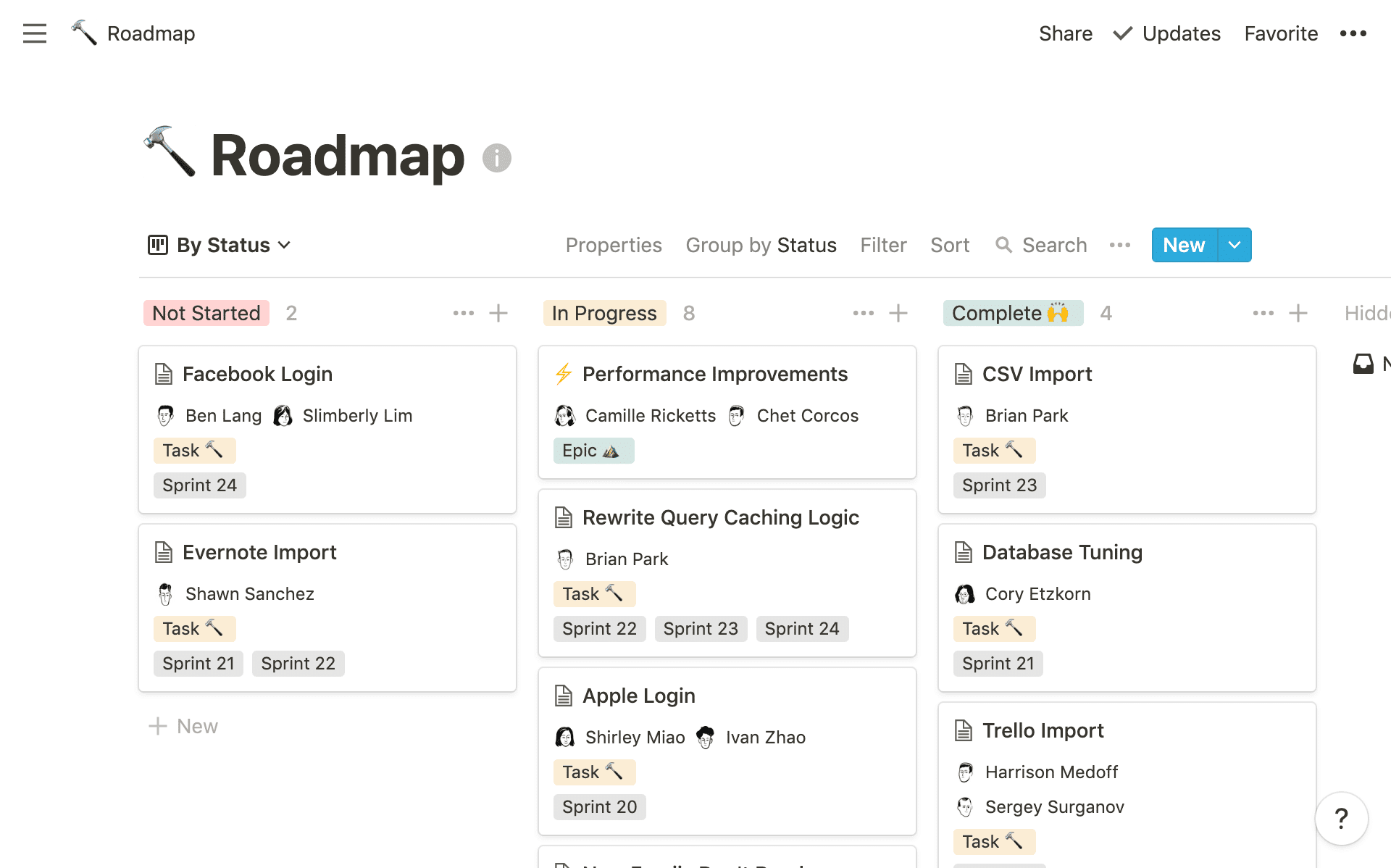
Notion is a great creative project management tool because it brings everything creative teams need into one place — notes and documents (like creative briefs or images), tasks and projects, and a team Wiki.
With Notion, a creative team can easily run design processes or brainstorming sessions. This flexible tool is easy-to-use and beginner friendly, which is why it's on our list of best project management tools for creative teams.
Features of Notion:
Team Wiki that is a central knowledge-base for everyone
Flexible Kanban boards and lists for tasks and projects
Shared notes for team-wide collaboration
To learn about other similar tools, check out this list of the top Notion alternatives that can satisfy your project management needs.
10. GanttPro
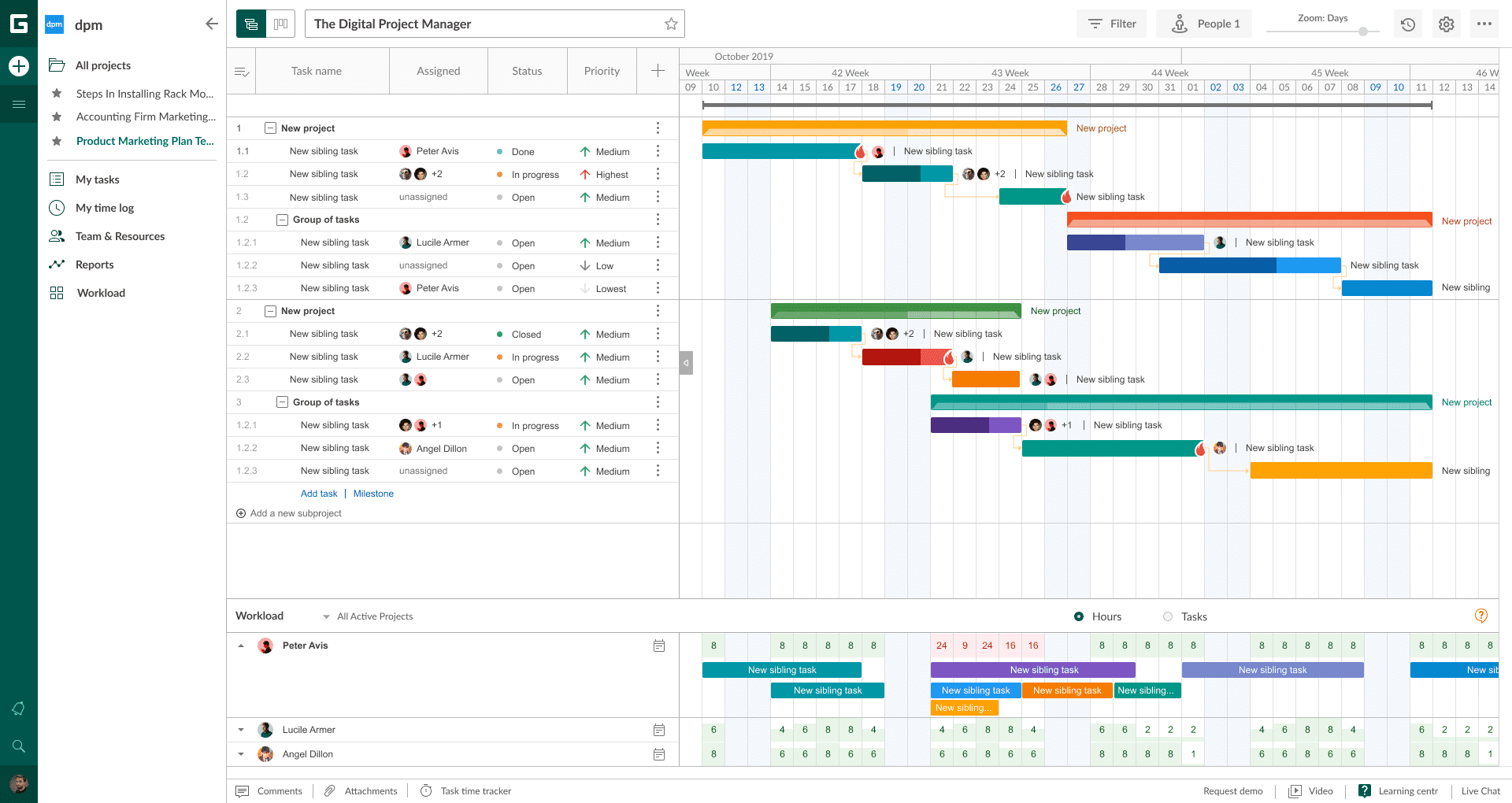
GanttPRO is one of the best Gantt chart-based project management tools for creative teams with the interface they really like. With GanttPRO, creatives can easily track and manage tasks, describe, comment, and attach files to them, track time, manage work across multiple projects and even project portfolios. With the help of the Export and Sharing features, it is a matter of seconds to share projects with third parties.
Features of GanttPRO:
Different project views: a Gantt chart, Board, My task list, and Portfolio
Powerful resource management
Time tracking
A variety of ready-made Gantt chart templates
Real-time team collaboration with comments, attachments, mentions, and notifications
Other great tools for creative teams to consider
11. Visme Visme is a content creation platform that is great tool for agencies, marketers, and any other creative team seeking to create impactful visuals without a high level of expertise. Visme is well known for its online presentation software, which is incredibly helpful for creative teams who need to present their ideas and pitch to clients. In addition, Visme offers tools for making infographics, social media assets, videos, and more content creation needs. While Visme isn't an all-encompassing project management tool, it does let teams collaborate through comments and markup editing, which is why it's on our list of best project management tools for creative teams. It also has a variety of online sharing and download options to scale your content as needed. Features of Visme:
1000+ different layouts and themes for presentations
Analytics to report and track engagement on specific content
Digital asset manager to store brand assets, logos, and files
Clients and teammates can view and comment on content
Annotations allow for editing on specific pieces of the content
12. Monday.com Monday is a simple creative project management tool that helps teams visually organize tasks and projects. Projects are managed via one central board, which serves as the hub for each project and reflects changes made on a task-by-task basis. Boards are also customizable — you can add new columns to see data on hours spent, status, and location. Creative teams enjoy Monday as a project management option because it's visually appealing and easy to glean quick bits of information at a glance. Want to explore other tools like Monday.com? Check out this comprehensive list of Monday.com alternatives on the market right now. Features of Monday:
Workflow centralization
Collaborate with internal and external stakeholders
Drag and drop rows for easy customization
Variety of views including Kanban, Gantt, workload, and calendar view
13. ProProfs Projects With ProProfs Project, you can save, manage and access portfolios in just a few clicks. Collaborate with cross-functional teams and maximize productivity with a tool that is customizable as per your project goals and team needs. Visualize creative project plans and automate tasks with the all-in-one creative project management software. You can even summarize financial reports with its detailed report generation capability. Bill your clients automatically with accurate invoices. Features of ProProfs:
Save and access creative portfolios on the go
Strategic project scheduling
Task alerts and notifications
Task timers to meet deadlines faster
Automate client billing
14. Teamwork.com Teamwork.com is a project management tool that allows you to see everything in one place so you can effortlessly manage your team, projects, clients, and freelancers. It doesn’t matter if you’re working from home or the office, Teamwork gives you everything you need to stay connected. Features of Teamwork.com:
Spend less time in email by keeping all project communications in one place
Automate your workflows and cut out repetitive tasks
Track time on every task and properly bill for all the hours your team works
Integrate all your favorite tools
Track your to-do’s by creating tasks only visible to you
15. Krock.io Krock.io is a project management tool for creative teams. Its visually appealing interface is well-suited for designers, video producers, and other creatives. With Krock.io, users can easily share and find files, track and manage work across multiple projects, store file assets, and use a calendar to track teams' workload. Features of Krock.io:
Online proofing for real-time feedback and annotations on videos, images, PDFs and more
Create AI-powered storyboards from text to save time and effort in the creation process
Version control to compare different iterations of a design or document
16. Walling Walling is a project management platform that appeals to creative teams, offering a visual wall-like interface, collaborative tools, and customization options. Its intuitive visual representation allows teams to grasp project progress quickly. Walling promotes seamless collaboration and real-time communication, enabling team members to share ideas and exchange files. The platform also offers customization options to accommodate unique workflows, allowing for flexible task organization. Features of Walling:
Visual wall-like interface for easy project status overview
Collaborative tools for real-time communication and file sharing
Task management and organization to streamline project execution
17. Trello Trello is a fantastic project management software choice for creative teams with an intuitive, card-based system. It provides a visual structure to organize tasks, making it easy to understand the flow of work and monitor progress. The layout is helpful for brainstorming, storyboarding, and other creative processes, encouraging collaboration and creativity. Each Trello card represents a task that can be filled with important details like checklists, attachments, due dates, and comments. This allows a creative team to adapt their workflow for a design project, marketing campaign, content calendar, or event planning. This flexibility extends to its use of boards – a team can have a board for every project, or even categorize boards by client, department, or any other criteria that fits the need. Features of Trello:
Extended functionality of boards with calendar views and custom fields
Integrations with other tools like Slack, Google Drive, and more
Notifications and reminders for due dates, comments, or any changes in the tasks
Real-time collaboration for multiple users working on the same board
18. Quip Quip is a spreadsheet application that offers robust collaboration capabilities, making it an attractive project management solution for creative teams. With Quip, you can @mention specific users to get their attention, leave comments on specific cells, and see a history of all the changes that have been made to the document. Quip also offers task management features so you can easily keep track of your team's progress. Quip integrates with a variety of other software programs giving it additional project management features, although is not as flexible as other project management software in terms of customization. Quip is sold within the Salesforce ecosystem; confirm current packaging and feature availability directly with Salesforce before purchase. Features of Quip:
Internal chat & real-time collaboration
Spreadsheet integration
Document editing features
PDF document conversion and editing features
If you’re running a creative team without a project management tool, you’re losing out on enhanced collaboration, streamlined workflows, and seamless communication. These are just a few of the project management tools for creative teams that we think you should consider. Do you work on a creative team that can benefit from one of these project management tools for creative teams? Learn more about how you can get started on Hive for free today. If there are features you haven't been able to find in any project management software for your creative team' we'd love for you to submit them on our product Forum.

" height="21.708px" id="ocyW7qRll" transform="translate(1 1)" width="22.825000000000003px"/></svg>)
" width="23.345px"/><path d="M 16.453 17.099 L 19.081 21.658 C 15.218 24.615 9.208 24.973 4.759 21.568 C -0.024 17.954 -1.4 11.36 1.539 6.134 C 4.692 0.594 10.591 -0.631 14.389 0.266 C 14.288 0.489 12.013 5.209 12.013 5.209 C 12.013 5.209 11.833 5.221 11.731 5.223 C 10.609 5.271 9.772 5.532 8.876 5.995 C 6.879 7.037 5.529 9.002 5.271 11.239 C 5.139 12.357 5.294 13.49 5.721 14.53 C 6.081 15.41 6.591 16.192 7.276 16.852 C 8.326 17.866 9.576 18.493 11.026 18.701 C 12.397 18.898 13.716 18.703 14.953 18.081 C 15.416 17.849 15.811 17.591 16.273 17.239 C 16.331 17.201 16.383 17.153 16.453 17.099 Z" fill="rgb(255, 73, 44)" height="24.000281511058695px" id="XZw0UJF9D" transform="translate(0 0.001)" width="19.081280403406165px"/><path d="M 5.071 2.811 L 4.431 2.182 C 4.308 2.06 4.19 1.933 4.063 1.814 C 4.018 1.771 3.965 1.712 3.965 1.712 L 4.026 1.584 C 4.268 1.098 4.647 0.744 5.096 0.461 C 5.593 0.146 6.173 -0.014 6.761 0.001 C 7.514 0.016 8.214 0.204 8.804 0.708 C 9.24 1.081 9.464 1.554 9.503 2.118 C 9.569 3.069 9.175 3.798 8.393 4.308 C 7.933 4.606 7.438 4.838 6.941 5.112 C 6.667 5.263 6.432 5.396 6.164 5.67 C 5.929 5.945 5.917 6.203 5.917 6.203 L 9.477 6.199 L 9.477 7.784 L 3.982 7.784 L 3.982 7.631 C 3.962 6.852 4.052 6.119 4.409 5.411 C 4.737 4.762 5.247 4.287 5.859 3.921 C 6.332 3.639 6.829 3.399 7.302 3.118 C 7.593 2.945 7.799 2.692 7.798 2.324 C 7.798 2.008 7.568 1.727 7.24 1.64 C 6.466 1.431 5.678 1.764 5.269 2.472 L 5.071 2.812 Z M 11.957 14.561 L 8.957 9.381 L 3.02 9.381 L 0 14.615 L 5.98 14.615 L 8.932 19.771 L 11.956 14.561 Z" fill="rgb(255, 73, 44)" height="19.770929946899415px" id="twZYfi9ck" transform="translate(11.391 0.852)" width="11.957px"/></g></svg>)

"/><stop offset="1" stop-color="rgb(100, 115, 255)"/></linearGradient></defs><g d="M 3 18 C 1.343 18 0 16.657 0 15 L 0 3 C 0 1.343 1.343 0 3 0 L 15 0 C 16.657 0 18 1.343 18 3 L 18 15 C 18 16.657 16.657 18 15 18 Z M 12.935 5.908 L 5.063 5.908 C 4.7 5.908 4.407 6.201 4.406 6.563 L 4.406 11.158 C 4.407 11.52 4.7 11.813 5.063 11.813 L 12.935 11.813 C 13.297 11.813 13.591 11.52 13.592 11.158 L 13.592 6.563 C 13.591 6.2 13.297 5.907 12.935 5.907 Z M 12.935 5.25 C 13.66 5.25 14.248 5.838 14.248 6.563 L 14.248 11.159 C 14.248 11.883 13.66 12.471 12.935 12.471 L 5.063 12.471 C 4.338 12.471 3.75 11.883 3.75 11.159 L 3.75 6.564 C 3.75 6.216 3.888 5.881 4.134 5.635 C 4.38 5.388 4.714 5.25 5.063 5.25 Z M 6.383 9.516 C 6.746 9.516 7.04 9.222 7.041 8.859 C 7.041 8.496 6.747 8.202 6.384 8.201 C 6.021 8.201 5.726 8.495 5.726 8.858 C 5.725 9.221 6.019 9.516 6.383 9.516 Z M 5.07 8.858 C 5.07 8.133 5.659 7.545 6.384 7.546 C 7.109 7.546 7.697 8.134 7.697 8.86 C 7.696 9.585 7.108 10.173 6.383 10.172 C 5.657 10.172 5.07 9.584 5.07 8.858 Z M 8.344 8.204 C 8.344 8.022 8.491 7.875 8.672 7.875 L 10.645 7.875 C 10.826 7.875 10.973 8.022 10.973 8.204 C 10.973 8.385 10.826 8.532 10.645 8.532 L 8.672 8.532 C 8.491 8.532 8.344 8.385 8.344 8.204 Z M 8.344 9.516 C 8.344 9.335 8.491 9.187 8.672 9.188 L 12.614 9.188 C 12.796 9.188 12.943 9.335 12.943 9.516 C 12.943 9.697 12.796 9.845 12.614 9.844 L 8.672 9.844 C 8.491 9.845 8.344 9.697 8.344 9.516 Z" fill="transparent" height="18px" id="BnQb7JQgX" transform="translate(1 0)" width="18px"><path d="M 3 18 C 1.343 18 0 16.657 0 15 L 0 3 C 0 1.343 1.343 0 3 0 L 15 0 C 16.657 0 18 1.343 18 3 L 18 15 C 18 16.657 16.657 18 15 18 Z" fill="url(%23ouhXAFazp-3938710607-linear-gradient)" height="18px" id="ouhXAFazp" width="18px"/><path d="M 9.185 0.658 L 1.313 0.658 C 0.95 0.658 0.657 0.951 0.656 1.313 L 0.656 5.908 C 0.657 6.27 0.95 6.563 1.313 6.563 L 9.185 6.563 C 9.547 6.563 9.841 6.27 9.842 5.908 L 9.842 1.313 C 9.841 0.95 9.547 0.657 9.185 0.657 Z M 9.185 0 C 9.91 0 10.498 0.588 10.498 1.313 L 10.498 5.909 C 10.498 6.633 9.91 7.221 9.185 7.221 L 1.313 7.221 C 0.588 7.221 0 6.633 0 5.909 L 0 1.314 C 0 0.966 0.138 0.631 0.384 0.385 C 0.63 0.138 0.964 0 1.313 0 Z M 2.633 4.266 C 2.996 4.266 3.29 3.972 3.291 3.609 C 3.291 3.246 2.997 2.952 2.634 2.951 C 2.271 2.951 1.976 3.245 1.976 3.608 C 1.975 3.971 2.269 4.266 2.633 4.266 Z M 1.32 3.608 C 1.32 2.883 1.909 2.295 2.634 2.296 C 3.359 2.296 3.947 2.884 3.947 3.61 C 3.946 4.335 3.358 4.923 2.633 4.922 C 1.907 4.922 1.32 4.334 1.32 3.608 Z M 4.594 2.954 C 4.594 2.772 4.741 2.625 4.922 2.625 L 6.895 2.625 C 7.076 2.625 7.223 2.772 7.223 2.954 C 7.223 3.135 7.076 3.282 6.895 3.282 L 4.922 3.282 C 4.741 3.282 4.594 3.135 4.594 2.954 Z M 4.594 4.266 C 4.594 4.085 4.741 3.937 4.922 3.938 L 8.864 3.938 C 9.046 3.938 9.193 4.085 9.193 4.266 C 9.193 4.447 9.046 4.595 8.864 4.594 L 4.922 4.594 C 4.741 4.595 4.594 4.447 4.594 4.266 Z" fill="rgb(255, 255, 255)" height="7.22100000000028px" id="wMIFp6fef" transform="translate(3.75 5.25)" width="10.497750858379534px"/></g></svg>)
"/><stop offset="1" stop-color="rgb(255, 227, 85)"/></linearGradient></defs><g d="M 3 18 C 1.343 18 0 16.657 0 15 L 0 3 C 0 1.343 1.343 0 3 0 L 15 0 C 16.657 0 18 1.343 18 3 L 18 15 C 18 16.657 16.657 18 15 18 Z M 9 10.219 C 9.725 10.219 10.313 9.631 10.313 8.906 C 10.313 8.181 9.725 7.594 9 7.594 C 8.275 7.594 7.688 8.181 7.688 8.906 C 7.688 9.631 8.275 10.219 9 10.219 Z M 7.031 8.906 C 7.031 7.819 7.913 6.938 9 6.938 C 10.087 6.938 10.969 7.819 10.969 8.906 C 10.969 9.994 10.087 10.875 9 10.875 C 7.913 10.875 7.031 9.994 7.031 8.906 Z M 13.594 6.281 L 6.375 6.281 C 6.375 7.369 5.494 8.25 4.406 8.25 L 4.406 11.531 L 11.625 11.531 C 11.625 10.444 12.506 9.563 13.594 9.563 Z M 13.594 11.531 L 13.594 10.219 C 13.063 10.219 12.584 10.538 12.381 11.029 L 12.381 11.03 C 12.315 11.189 12.281 11.359 12.281 11.531 Z M 4.406 6.281 L 4.406 7.594 C 4.937 7.594 5.416 7.274 5.619 6.784 L 5.619 6.783 C 5.685 6.624 5.719 6.453 5.719 6.281 Z M 13.594 5.625 C 13.956 5.625 14.25 5.919 14.25 6.281 L 14.25 11.531 C 14.25 11.894 13.956 12.188 13.594 12.188 L 4.406 12.188 C 4.044 12.188 3.75 11.894 3.75 11.531 L 3.75 6.281 C 3.75 5.919 4.044 5.625 4.406 5.625 Z M 5.619 11.029 C 5.416 10.538 4.937 10.219 4.406 10.219 L 4.406 9.563 C 5.494 9.563 6.375 10.444 6.375 11.531 L 5.719 11.531 C 5.719 11.359 5.685 11.189 5.619 11.03 Z M 12.381 6.783 C 12.315 6.624 12.281 6.453 12.281 6.281 L 11.625 6.281 C 11.625 7.369 12.506 8.25 13.594 8.25 L 13.594 7.594 C 13.063 7.594 12.584 7.274 12.381 6.784 Z" fill="transparent" height="18px" id="KWz7nZF9u" transform="translate(1 0)" width="18px"><path d="M 3 18 C 1.343 18 0 16.657 0 15 L 0 3 C 0 1.343 1.343 0 3 0 L 15 0 C 16.657 0 18 1.343 18 3 L 18 15 C 18 16.657 16.657 18 15 18 Z" fill="url(%23lJEjHEBum-428199637-linear-gradient)" height="18px" id="lJEjHEBum" width="18px"/><path d="M 5.25 4.594 C 5.975 4.594 6.563 4.006 6.563 3.281 C 6.563 2.556 5.975 1.969 5.25 1.969 C 4.525 1.969 3.938 2.556 3.938 3.281 C 3.938 4.006 4.525 4.594 5.25 4.594 Z M 3.281 3.281 C 3.281 2.194 4.163 1.313 5.25 1.313 C 6.337 1.313 7.219 2.194 7.219 3.281 C 7.219 4.369 6.337 5.25 5.25 5.25 C 4.163 5.25 3.281 4.369 3.281 3.281 Z M 9.844 0.656 L 2.625 0.656 C 2.625 1.744 1.744 2.625 0.656 2.625 L 0.656 5.906 L 7.875 5.906 C 7.875 4.819 8.756 3.938 9.844 3.938 Z M 9.844 5.906 L 9.844 4.594 C 9.313 4.594 8.834 4.913 8.631 5.404 L 8.631 5.405 C 8.565 5.564 8.531 5.734 8.531 5.906 Z M 0.656 0.656 L 0.656 1.969 C 1.187 1.969 1.666 1.649 1.869 1.159 L 1.869 1.158 C 1.935 0.999 1.969 0.828 1.969 0.656 Z M 9.844 0 C 10.206 0 10.5 0.294 10.5 0.656 L 10.5 5.906 C 10.5 6.269 10.206 6.563 9.844 6.563 L 0.656 6.563 C 0.294 6.563 0 6.269 0 5.906 L 0 0.656 C 0 0.294 0.294 0 0.656 0 Z M 1.869 5.404 C 1.666 4.913 1.187 4.594 0.656 4.594 L 0.656 3.938 C 1.744 3.938 2.625 4.819 2.625 5.906 L 1.969 5.906 C 1.969 5.734 1.935 5.564 1.869 5.405 Z M 8.631 1.158 C 8.565 0.999 8.531 0.828 8.531 0.656 L 7.875 0.656 C 7.875 1.744 8.756 2.625 9.844 2.625 L 9.844 1.969 C 9.313 1.969 8.834 1.649 8.631 1.159 Z" fill="rgb(255, 255, 255)" height="6.5625px" id="KFq2RYI1q" transform="translate(3.75 5.625)" width="10.5px"/></g></svg>)
"/><stop offset="1" stop-color="rgb(167, 104, 245)"/></linearGradient></defs><g d="M 3 18 C 1.343 18 0 16.657 0 15 L 0 3 C 0 1.343 1.343 0 3 0 L 15 0 C 16.657 0 18 1.343 18 3 L 18 15 C 18 16.657 16.657 18 15 18 Z M 4.5 8.312 L 4.5 9.625 M 6.25 6.563 L 6.25 11.375 M 8 5.25 L 8 13.125 M 9.75 7.438 L 9.75 10.5 M 11.5 6.125 L 11.5 11.813 M 13.25 8.312 L 13.25 9.625" fill="transparent" height="18px" id="pF3TbKfmM" transform="translate(1 0)" width="18px"><path d="M 3 18 C 1.343 18 0 16.657 0 15 L 0 3 C 0 1.343 1.343 0 3 0 L 15 0 C 16.657 0 18 1.343 18 3 L 18 15 C 18 16.657 16.657 18 15 18 Z" fill="url(%23FrczkRR99-2708623427-linear-gradient)" height="18px" id="FrczkRR99" width="18px"/><path d="M 0 3.062 L 0 4.375 M 1.75 1.313 L 1.75 6.125 M 3.5 0 L 3.5 7.875 M 5.25 2.188 L 5.25 5.25 M 7 0.875 L 7 6.563 M 8.75 3.062 L 8.75 4.375" fill="transparent" height="7.875000000000012px" id="brxEeEkb3" stroke-dasharray="" stroke-linecap="round" stroke-linejoin="round" stroke-width="1.167" stroke="rgb(255, 255, 255)" transform="translate(4.5 5.25)" width="8.749500274658203px"/></g></svg>)
"/><stop offset="1" stop-color="rgb(167, 104, 245)"/></linearGradient></defs><g d="M 3 18 C 1.343 18 0 16.657 0 15 L 0 3 C 0 1.343 1.343 0 3 0 L 15 0 C 16.657 0 18 1.343 18 3 L 18 15 C 18 16.657 16.657 18 15 18 Z M 6.5 13.25 C 6.017 13.25 5.625 12.858 5.625 12.375 L 5.625 5.375 C 5.625 4.892 6.017 4.5 6.5 4.5 L 10 4.5 C 10.28 4.5 10.549 4.611 10.746 4.809 L 12.316 6.379 C 12.514 6.576 12.626 6.845 12.625 7.125 L 12.625 12.375 C 12.625 12.858 12.234 13.25 11.75 13.25 Z M 10.063 4.5 L 10.063 6.688 C 10.063 6.929 10.259 7.125 10.5 7.125 L 12.688 7.125 M 7.875 10.187 L 8.75 11.062 L 10.5 9.312" fill="transparent" height="18px" id="glIKomR_5" transform="translate(1 0)" width="18px"><path d="M 3 18 C 1.343 18 0 16.657 0 15 L 0 3 C 0 1.343 1.343 0 3 0 L 15 0 C 16.657 0 18 1.343 18 3 L 18 15 C 18 16.657 16.657 18 15 18 Z" fill="url(%23s45ovHRAB-1449222707-linear-gradient)" height="18px" id="s45ovHRAB" width="18px"/><path d="M 0.875 8.75 C 0.392 8.75 0 8.358 0 7.875 L 0 0.875 C 0 0.392 0.392 0 0.875 0 L 4.375 0 C 4.655 0 4.924 0.111 5.121 0.309 L 6.691 1.879 C 6.889 2.076 7.001 2.345 7 2.625 L 7 7.875 C 7 8.358 6.609 8.75 6.125 8.75 Z" fill="transparent" height="8.750251186662663px" id="B08F9xBkg" stroke-dasharray="" stroke-linecap="round" stroke-linejoin="round" stroke-width="1.167" stroke="rgb(255, 255, 255)" transform="translate(5.625 4.5)" width="7.0005011922364515px"/><path d="M 2.188 0 L 2.188 2.188 C 2.188 2.429 2.384 2.625 2.625 2.625 L 4.813 2.625 M 0 5.687 L 0.875 6.562 L 2.625 4.812" fill="transparent" height="6.561750274658204px" id="MOrnXSoTf" stroke-dasharray="" stroke-linecap="round" stroke-linejoin="round" stroke-width="1.167" stroke="rgb(255, 255, 255)" transform="translate(7.875 4.5)" width="4.812750041484833px"/></g></svg>)